
Speed to lead and relevance are everything in B2B sales and marketing. Yet, many teams remain trapped in siloed, highly manual processes. Marketing teams spend valuable hours chasing administrative tasks, while sales reps waste time calling cold or unqualified contacts.
The answer is not simply "more marketing activities". The answer lies in building automated, trigger-based systems that connect buyer intent directly to pipeline opportunities. By implementing the right marketing automation workflows, B2B organisations can systematically capture anonymous demand, deliver tailored nurturing, notify sales of active buyers, and secure long-term customer loyalty.
Below, we break down the four essential marketing workflows and provide actionable B2B marketing automation templates that will transform your B2B go-to-market engine.
1. The Anonymous Website Visitor Identification Software: Marketing Automation Workflows
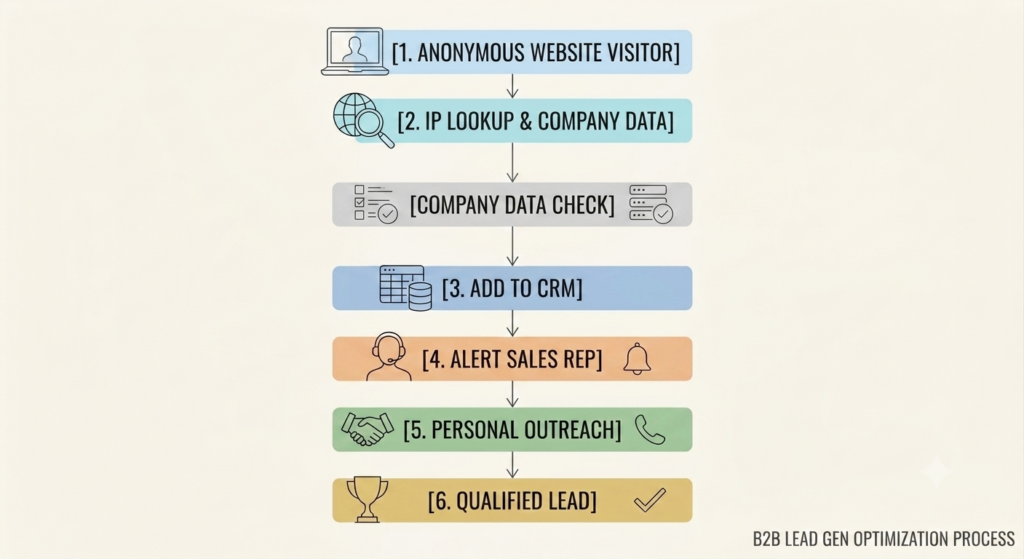
An anonymous website visitor identification workflow uses real-time IP lookup and firmographic enrichment to identify the companies browsing your website, even if they never fill out a form. Instead of losing the 95% of traffic that leaves your site silently, this workflow deanonymises those visits and automatically feeds highly qualified corporate accounts directly into your CRM or outbound sales queue.
Most B2B websites experience high bounce rates because buyers prefer to conduct self-directed research without filling out gated forms. By deploying first-party visitor identification software on your site via a platform like Dynamic Leads, you can capture these active buyer signals instantly. This is a game-changer for modern B2B lead generation as it uncovers hidden intent.
Using professional-grade visitor identification software ensures you don't miss accounts actively researching your solutions. The workflow triggers the moment a visitor arrives. The platform instantly resolves their IP address to a physical company name, enriches the record with firmographic data (such as industry vertical, employee count, and headquarters location), and checks if the company matches your Ideal Customer Profile (ICP). If it is a match, the workflow creates a lead or updates an existing account in your CRM, bypasses manual data entry, and alerts the relevant business development rep.
Step-by-Step Implementation Guide
1.Deploy tracking script:
Install the Dynamic Leads lightweight tracking pixel in the global header of your website to start monitoring incoming traffic.
2.Define your ICP filters:
Set your automated filters within the platform to only trigger notifications for high-fit target accounts (e.g., companies with 50+ employees in the SaaS or IT sectors).
3.Map data to CRM fields:
Configure the integration to map company data, viewed pages, and visit duration directly into corresponding Salesforce, HubSpot, or Zoho CRM fields.
4.Set up sales alerts:
Build a trigger that alerts the assigned sales rep via Slack or email when an active target account visits your high-intent pricing or product pages.
Common Mistakes with Visitor Identification Software:
- Alerting on ISPs: Failing to filter out residential Internet Service Providers (like BT, Virgin Media, or Comcast), resulting in sales reps receiving useless notifications for household connections.
- Failing to Alert Sales Fast: Leaving the identified company data inside a separate dashboard where sales reps never look, rather than pushing it directly into their daily CRM workflow.
- Action Step: Learn more about our company mission on our About Us page, or start a free trial of our tailored Dynamic Leads Solutions to see exactly which companies are exploring your solutions in real time.
2. Intent-Based Lead Nurturing & B2B Lead Generation
An intent-based lead nurturing workflow is an automated sequence that changes and adapts its messaging based on the explicit content topics and pages a buyer interacts with. Rather than sending the same generic product sequence to every single contact, this workflow uses behavioral triggers within your marketing workflows to deliver contextually relevant content that moves prospects through the funnel organically.
Step-by-Step Implementation Guide

1.Inventory your content assets:
Group your existing blog posts, whitepapers, and case studies into 3-4 distinct topical pillars (e.g., Cybersecurity, Compliance, Scalability).
2.Build automated entry criteria:
Set up trigger rules in your marketing automation platform (such as "Form filled: Cloud Security Guide" OR "Visited Cloud Security page 3+ times").
3.Establish if/then branching rules:
Configure your workflow branches to check whether a recipient opened the previous email or clicked the call-to-action before sending the next touchpoint.
4.Set up automatic unenrollment:
Always establish an unenrollment goal (like "Booked a Demo" or "Status changed to SQL") to ensure active buyers are instantly removed from cold marketing streams.
Common Mistakes to Avoid:
- Over-emailing Contacts: Flooding a buyer's inbox with daily messages, which drives up spam complaints and opt-out rates. Keep delays to at least 3-4 days between touches.
- No Exit Criteria: Forgetting to unenroll prospects once they take the primary desired action, resulting in hot leads receiving "top-of-funnel" introductory tips after they have already booked a sales demo.
- Next Step: To learn how emerging tools are shaping these journeys, check out these insights on AI Sales Enablement Trends to keep your nurturing paths cutting-edge and highly efficient.
3. Designing Better Sales and Marketing Alignment Workflows
An account-based engagement alert workflow tracks the collective, multi-contact activities of an entire target account rather than evaluating individual leads in isolation. Because B2B buying groups average 6 to 10 stakeholders, this workflow signals your sales team the exact moment multiple employees from a target company start researching your solutions simultaneously.
Step-by-Step Implementation Guide
1.Configure target account lists:
Upload your list of key target accounts (or define tier parameters based on revenue and industry) into your automation and tracking system.
2.Define collective scoring rules:
Assign point values to actions (e.g., blog visit = 2 points, pricing page visit = 10 points, viewing a demo video = 15 points) and set an account trigger threshold (e.g., 30 points).
3.Build the internal notification template:
Design an automated alert that pulls the company name, industry, and the specific pages viewed by all stakeholders into a clear message.
4.Automate outbound task creation:
Use your CRM integration to automatically generate high-priority follow-up tasks for sales representatives, complete with a 24-hour completion deadline.
Common Mistakes to Avoid:
- Focusing on Individual MQLs: Allowing your sales team to waste valuable time chasing low-level, non-decision makers who downloaded a single PDF, while ignoring high-intent, multi-stakeholder corporate activity.
- Lack of Sales and Marketing Alignment: Failing to establish a clear, documented agreement on how quickly sales must act on an account-based intent alert.
4. Post-Sale Customer Retention & Expansion Marketing Workflows
A customer retention and expansion workflow is an automated post-sale loop designed to maximize customer lifetime value (LTV) by triggering targeted messages, training modules, and upsell prompts based on product usage. By ensuring customers successfully adopt your platform and automatedly prompting them at key renewal milestones, this workflow keeps retention rates high and secures expansion revenue.
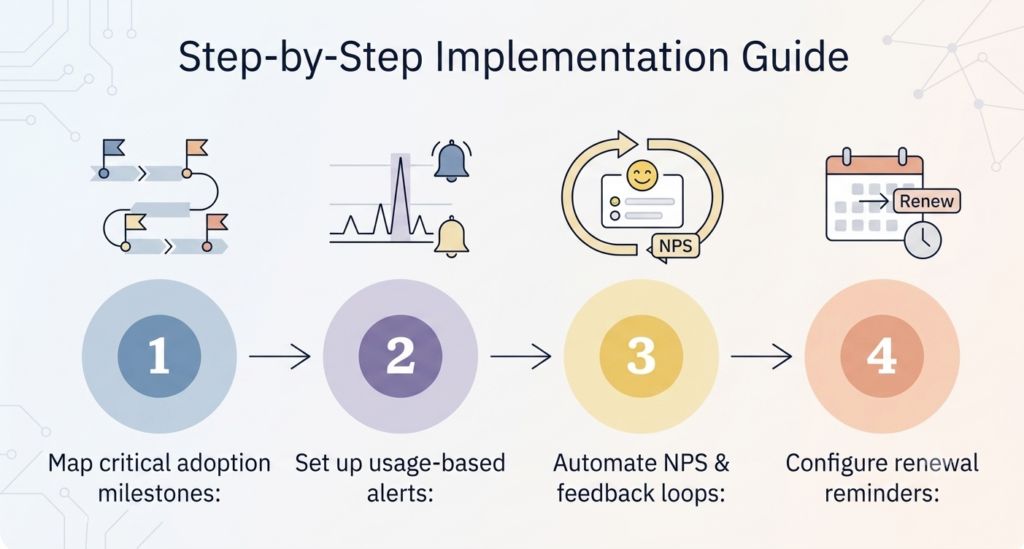
Step-by-Step Implementation Guide
1.Map critical adoption milestones:
Identify the 3-4 key actions a new user must complete in their first 30 days to derive value from your platform (e.g., inviting teammates, saving a dashboard).
2.Set up usage-based alerts:
Configure your automation tool to monitor API events or logging frequency, setting up a "risk trigger" if usage drops to zero for 7 consecutive days.
3.Automate NPS & feedback loops:
Schedule an automated Net Promoter Score (NPS) survey to go out 60 days prior to contract renewal, routing promoters to review sites and detractors to customer support.
4.Configure renewal reminders:
Create an automated 90-day renewal sequence that highlights the ROI the customer has achieved and details upcoming features to secure contract renewals.
Common Mistakes to Avoid:
- Pitching Upgrades Prematurely: Attempting to sell expansion packages to a customer who has not yet fully adopted or configured their primary software subscription.
- Neglecting Inactive Accounts: Allowing customers to go silent for months without automated outreach, only to discover they have chosen not to renew when it is already too late to save the account.
- According to Forrester, misaligned sales and marketing teams cost businesses growth, yet 65% of front-line employees feel they aren't aligned. Dynamic Leads solves this by showing both teams exactly who is browsing your site in real time."
- "Unmask the 'Dark Funnel.' As 6sense points out, your best prospects are researching you anonymously right now. Don't wait for them to fill out a form, identify them today with Dynamic Leads."
Myth vs. Fact: B2B Marketing Automation
- Myth: Marketing automation replaces the need for personal sales interactions.
Fact: Marketing automation does not replace human interaction, it scales it. By eliminating manual prospecting and timing outreach based on real-time intent, automation gives your sales reps the exact context they need to have far more effective, warm conversations. - Myth: You need thousands of website visitors for visitor identification to be valuable.
Fact: In B2B, a single visit from a high-value enterprise target account can be worth thousands of pounds. Identifying just five highly qualified companies browsing your site every week is far more valuable than generating thousands of random consumer clicks.
Turn Silent Traffic into Active Pipeline
Building a high-performing B2B go-to-market engine doesn't require complex, over-engineered systems; it simply requires connecting the dots between active buyer intent and your sales outreach. By integrating visitor identification software into your core marketing automation workflows, you eliminate the guesswork that keeps sales and marketing teams misaligned. Stop waiting for prospects to self-report through traditional forms while they research in the shadows. Implement these automated loops today, unmask the hidden opportunities already exploring your website, and turn anonymous web traffic into your most predictable source of pipeline growth.
Ready to Uncover Your Hidden B2B Pipeline?
Most of your website visitors are researching your solutions right now, but they will never fill out a contact form. Stop letting valuable, in-market corporate accounts slip away to your competitors.
- See Who's Looking: Start a free trial of our tailored Dynamic Leads Solutions to see exactly which companies are exploring your website in real time.
- Learn Our Story: Find out how we help businesses bridge the gap between marketing and sales on our About Us page.
Frequently Asked Questions
How long does it take to see results from a visitor identification workflow?
Typically, you will see identified companies within minutes of installing the tracking script. Once integrated with your CRM, it immediately starts surfacing active, in-market target accounts that were previously invisible to your team.
Can we build these B2B workflows using our existing marketing platforms?
Yes. Most leading CRM and marketing automation platforms (including HubSpot, Salesforce, and Marketo) allow you to build custom triggers. You simply need to feed them with high-quality, external visitor identification and intent data.
What is the industry benchmark for email delays in nurture sequences?
For standard informational nurturing, we recommend waiting 3 to 5 days between touches. Sending emails too frequently increases unsubscribe rates, while waiting longer than 7 days causes prospects to lose interest.
What is the difference between contact-level and account-level automation?
Contact-level automation tracks and emails a single individual based on their actions. Account-level automation tracks the collective actions of multiple stakeholders from the same company, giving you a complete view of organization-wide interest.